Evading Sysmon Dns Monitoring In 2026

Back in 2019, XPN published Evading Sysmon DNS Monitoring, documenting an interesting look into how Sysmon collected DNS telemetry through ETW. The research was performed against Sysmon 10.1 and demonstrated that DNS visibility could ultimately be traced back to the Windows DNS Client ETW provider.
Seven years later, I wanted to revisit the same telemetry path on a modern Windows environment.
For this research, I am using Windows 11 with Sysmon 15.22, the current Sysmon release at the time of writing. Microsoft continues to document Event ID 22 (DNS Query) as the event generated when a process performs a DNS query, including queries that fail or are satisfied from cache.
The goal is not to reproduce the original proof of concept. Instead, I want to understand whether the underlying telemetry path has remained the same, what has changed since 2019, and where the boundary between the Windows DNS stack and Sysmon actually sits.
Why DNS Telemetry Matters
DNS is an interesting source of telemetry from a defensive perspective.
Malware does not necessarily need a traditional HTTP or TCP-based channel to communicate with its infrastructure. DNS can also be used as a communication mechanism, including command-and-control scenarios where information is encoded into DNS queries.
This makes process-level DNS visibility particularly valuable.
If a process suddenly starts generating queries such as:
1
2
3
j3k29d.example-c2.com
x7f82a.example-c2.com
p9q1bc.example-c2.com
being able to associate those queries with the originating process gives a defender an additional piece of context.
Sysmon’s DNS Query event is designed to provide exactly this type of visibility.Event ID 22 records DNS queries generated by processes and is configurable through the DnsQuery event filter.
That leads to a simple question: Where does Sysmon actually get this DNS information?
Looking Under Sysmon
A convenient starting point is logman. Windows exposes active ETW trace sessions through the -ets option: logman.exe -ets On my test system, several Sysmon-related sessions were visible:
1
2
3
EventLog-Microsoft-Windows-Sysmon-Operational
SYSMON TRACE
SysmonDnsEtwSession
The name that immediately caught my attention was: SysmonDnsEtwSession
This suggests that DNS collection is backed by a dedicated ETW trace session. We can inspect the session directly: logman SysmonDnsEtwSession -ets
Among the output is the provider attached to the session:
1
2
3
Provider:
Name:                 Microsoft-Windows-DNS-Client
Provider Guid:        {1C95126E-7EEA-49A9-A3FE-A378B03DDB4D}
This is the first important piece of the puzzle. The DNS telemetry consumed by this trace session originates from: Microsoft-Windows-DNS-Client - {1C95126E-7EEA-49A9-A3FE-A378B03DDB4D}
At this point, we have moved below the Sysmon event itself.
The exact implementation details are important here: Microsoft-Windows-DNS-Client is the ETW provider, while SysmonDnsEtwSession is the trace session collecting events from that provider. Sysmon is then able to consume the resulting telemetry and expose relevant information through its own event stream.
Inspecting the DNS Client Provider
Now that we have the provider name and GUID, we can ask Windows for more information: logman query providers "Microsoft-Windows-DNS-Client" The output provides considerably more information about the provider. First, we get the provider identity:
1
2
3
Provider                                 GUID
-------------------------------------------------------------------------------
Microsoft-Windows-DNS-Client             {1C95126E-7EEA-49A9-A3FE-A378B03DDB4D}
Then we get the provider’s available keywords:
1
2
3
4
5
6
7
8
9
10
11
12
13
14
15
16
17
18
19
20
21
22
Value               Keyword              Description
-------------------------------------------------------------------------------
0x0000000000000100  ut:GenericEvent
0x0000000010000000  ut:DnsAutoLogKeyword
0x0000000020000000  ut:PolicyTable
0x0000000040000000  ut:PerfCheckPoints
0x0000000080000000  ut:RegistrationEvent
0x0000000100000000  ut:SendPath
0x0000000200000000  ut:ReceivePath
0x0000000400000000  ut:L3ConnectPath
0x0000000800000000  ut:L2ConnectPath
0x0000001000000000  ut:ClosePath
0x0000002000000000  ut:Authentication
0x0000004000000000  ut:Configuration
0x0000008000000000  ut:Global
0x0000010000000000  ut:Dropped
0x0000020000000000  ut:PiiPresent
0x0000040000000000  ut:Packet
0x0000080000000000  ut:Address
0x0000100000000000  ut:StdTemplateHint
0x8000000000000000  Microsoft-Windows-DNS-Client/Operational Microsoft-Windows-DNS Client Events/Operational
0x4000000000000000  System               System
There are several interesting details here.
The provider is not simply a single “DNS query event.” It exposes a much larger set of telemetry categories covering different parts of the DNS client’s behavior.
We also get the available ETW levels:
1
2
3
4
5
Value               Level                Description
-------------------------------------------------------------------------------
0x02                win:Error            Error
0x03                win:Warning          Warning
0x04                win:Informational    Information
and the last part which is that a list of process that providing the logs (a list of processes that have imported dnsapi.dll)
My first instinct was to search for the provider GUID directly in the Sysmon binary a quick and dirty string search. That came up empty. So I opened sysmon.exe in IDA and started reversing. Eventually I found the function responsible for setting up the DNS trace session:
1
2
3
4
5
6
7
8
9
10
11
12
13
14
15
16
17
18
  if ( a1 )
  {
    started = StartTraceW(&TraceHandle, L"SysmonDnsEtwSession", (PEVENT_TRACE_PROPERTIES)v3);
    if ( !started )
    {
      started = EnableTraceEx2(TraceHandle, &ProviderId, 1u, 4u, 0, 0, 0, 0);
      sub_493E9A(0, 0, (LPCWSTR)sub_456430, 0, 0, (int)&v10);
      if ( !started )
        goto LABEL_16;
    }
    if ( !TraceHandle )
    {
      ControlTraceW(0, L"SysmonDnsEtwSession", (PEVENT_TRACE_PROPERTIES)v3, 1u);
      goto LABEL_15;
    }
    EnableTraceEx2(TraceHandle, &ProviderId, 0, 4u, 0, 0, 0, 0);
  }
  started = ControlTraceW(TraceHandle, L"SysmonDnsEtwSession", (PEVENT_TRACE_PROPERTIES)v3, 1u);
and the GUID was there:
1
2
const GUID ProviderId:
GUID <1C95126Eh, 7EEAh, 49A9h, <0A3h, 0FEh, 0A3h, 78h, 0B0h, 3Dh,0DBh, 4Dh>>
Which expands to {1C95126E-7EEA-49A9-A3FE-A378B03DDB4D} exactly the Microsoft-Windows-DNS-Client provider GUID we saw earlier. Confirmed: Sysmon calls StartTraceW to create the SysmonDnsEtwSession ETW session, then uses EnableTraceEx2 to subscribe to DNS events from that provider.
- Triggering Event ID 22 — a Minimal Test Case
1
2
3
4
5
6
7
8
9
10
11
12
13
14
15
16
17
18
19
20
21
22
23
24
25
26
#include <windows.h>
#include <windns.h>
#include <stdio.h>

#pragma comment(lib, "dnsapi.lib")

int main(void) {
    PDNS_RECORD results = nullptr;

    DNS_STATUS status = DnsQuery_A(
        "binary-win.github.io",
        DNS_TYPE_A,
        DNS_QUERY_STANDARD,
        nullptr,
        &results,
        nullptr);

    if (status != ERROR_SUCCESS) {
        printf("DnsQuery_A failed with error: %ld\n", status);
        return 1;
    }

    printf("DNS query succeeded.\n");

    return 0;
}
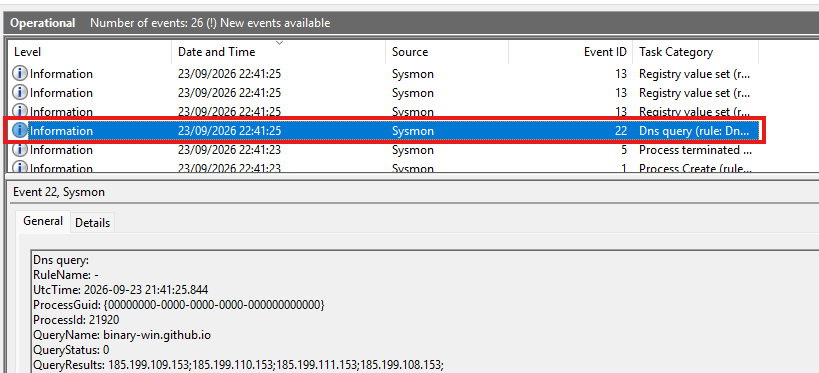
Running it produced exactly the Sysmon event sequence you’d expect: Event ID Meaning 1 ProcessCreate - our binary launched 22 DNSEvent - the query to blog.xpnsec.com 13 RegistrySetValue - Sysmon wrote the image path to AppCompatFlags (first-time execution) 5 ProcessTerminate - process exited
Event ID 22 is the one we care about. The question now is: what happens between the ETW event arriving at SysmonDnsEtwSession and Sysmon writing that structured log entry? That’s where WinDbg comes in.
Silencing Sysmon’s DNS Logging — Patching the ETW Emit Path
Since DnsQuery_A is exported from dnsapi.lib, I opened the DLL in IDA alongside WinDbg to hunt for the provider GUID we identified earlier — {1C95126E-7EEA-49A9-A3FE-A378B03DDB4D}.
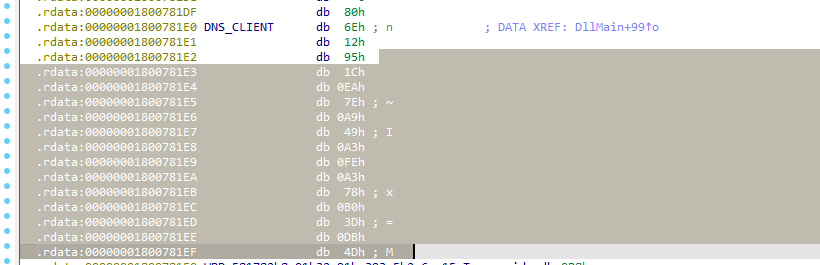
The GUID was there, referenced by a symbol named DNS_CLIENT — consistent with what XPN had documented. Following the cross-references led to McGenEventRegister, which in this version of the DLL had been renamed to McGenEventRegister_EtwEventRegister. Same pattern, new name.

Tracing the Emit Path
From there I traced where the actual event write happens. The callback chain bottoms out at EtwEventWriteTransfer, with the full callstack looking like this:
1
2
3
4
5
6
7
[0x0]  ntdll!EtwEventWriteTransfer
[0x1]  DNSAPI!McGenEventWrite_EtwEventWriteTransfer+0x3f
[0x2]  DNSAPI!DnsEtwTraceQueryExStart+0x3d8
[0x3]  DNSAPI!Query_PrivateExW+0x227
[0x4]  DNSAPI!Query_Shim+0x159
[0x5]  DNSAPI!DnsQuery_A+0x51
[0x6]  ConsoleApplication12!main+0x28
Compared to XPN’s original callstack:
1
2
3
4
5
DNSAPI!McGenEventWrite+0x3f
DNSAPI!McTemplateU0zqxqz+0xdb
DNSAPI!Query_PrivateExW+0x27ae1
DNSAPI!Query_Shim+0xbd
DNSAPI!DnsQuery_A+0x29
The structure is the same but the intermediate functions have changed , McTemplateU0zqxqz is gone, replaced by DnsEtwTraceQueryExStart. Microsoft refactored the internals but the ETW emit mechanism is identical.
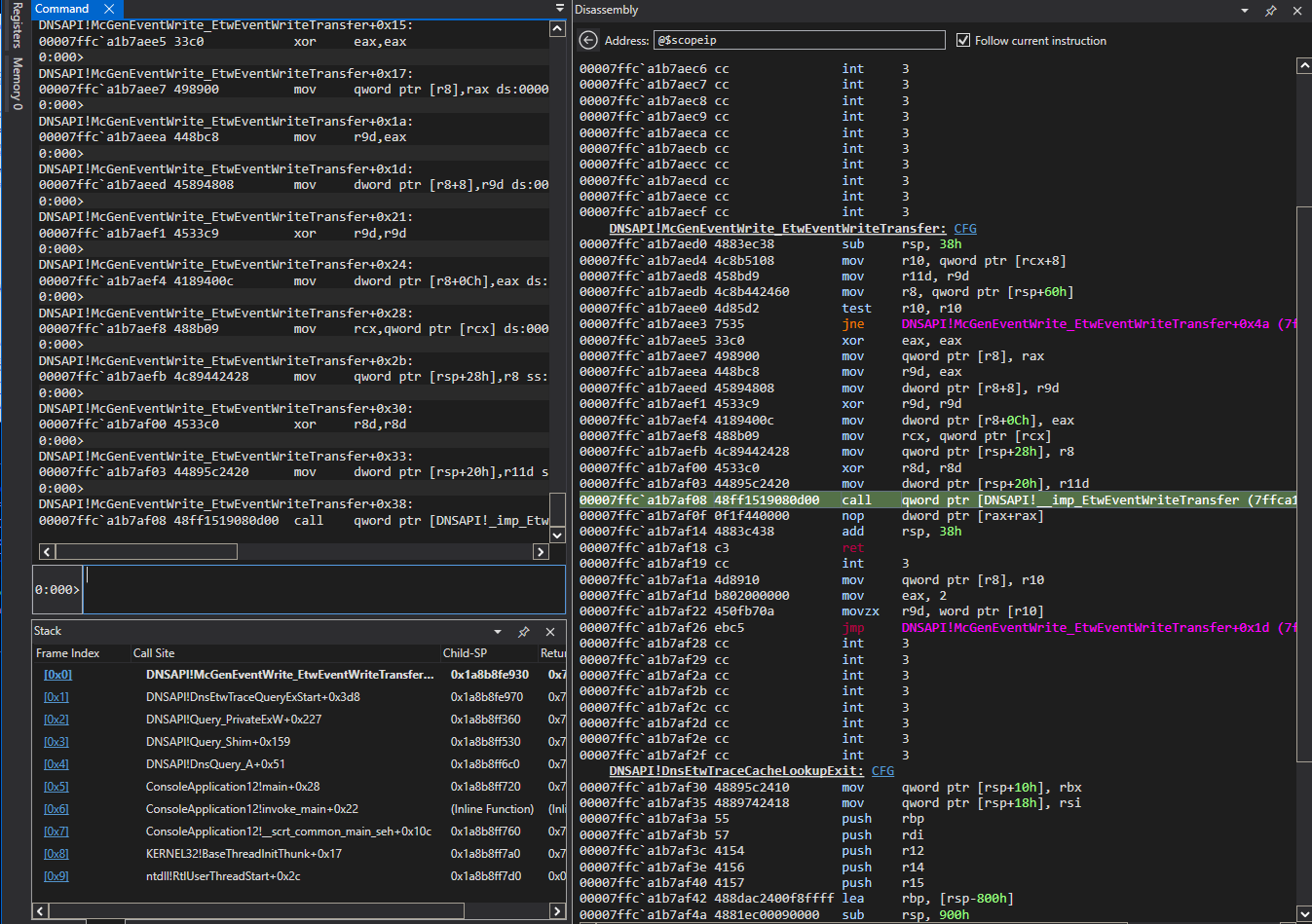
With the callstack mapped out, the target was clear: DnsEtwTraceQueryExStart, the function that leads to EtwEventWriteTransfer. I patched it with a C3 (ret) and sent a DNS query. Sysmon still logged it.
So there’s at least one more emit site. Going back to WinDbg and stepping through instruction by instruction, then cross-referencing in IDA, a second call site showed up: DnsEtwTraceQueryExComplete. The naming makes sense in hindsight, one function fires at the start of the query, the other at completion. Both independently emit ETW events.
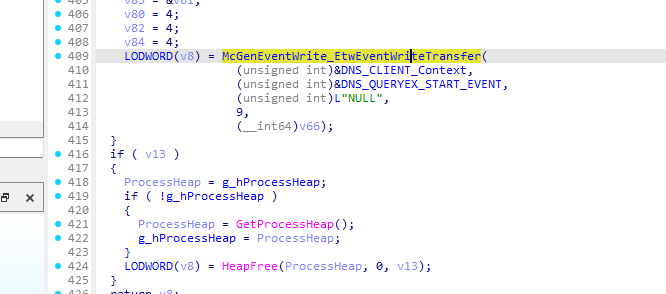
- First Patch Attempt — Naive ret The obvious first move was to patch both
DnsEtwTraceQueryExStartandDnsEtwTraceQueryExCompletewith C3 (ret) at their entry points. Sent the query. Still logged.
A bare ret at the function entry isn’t enough the emit decision is gated by conditional jumps inside each function, so patching the prologue doesn’t prevent EtwEventWriteTransfer from being reached on a different code path.
- Second Attempt — Patching the Conditional Jumps Back in WinDbg, this time with Sysmon absent, I stepped through both functions and watched which branch gets taken when no ETW session is listening, that’s the natural no-emit path. That gave me the exact
JEinstructions inside bothDnsEtwTraceQueryExStartandDnsEtwTraceQueryExCompletethat gate the write.
The fix: flip those JE instructions to unconditional JMP, forcing execution to always take the no-emit branch regardless of whether a session is listening.
Sent the query. No Event ID 22. No log generated
What This Tells Us
The ETW emit decision lives entirely inside dnsapi.dll, not in Sysmon. Sysmon just consumes what the provider emits. Patch the provider’s emit path at the right conditional branch, and Sysmon never sees the event — there’s nothing for it to log.